How do I talk to physical devices from my cloud software?
- What if your POS software had to run elsewhere too: on Mac, Android, Windows?What you wrote for one platform, you have to write again for the next.
- What if the store wants a different cash register or scale?You get to adapt your software again.
- What if any of the devices gets new software?You get to test again, and fix whatever broke.
With Bridge, none of that matters. You call a single REST API from any platform: a box in the store connects to the devices and keeps the connection to the cloud. We write the drivers, and we keep up with the device updates too.
Bridge is in pilot: the API is taking shape together with our pilot partners. The example shows its planned form; the final documentation arrives with the sandbox.
POST https://bridge.ecosoft.hu/v1/devices/REG-0042/receipt
Authorization: Bearer <API key>
Idempotency-Key: a6f1c2e0-order-1187

{
  "items": [
    { "name": "Coffee", "quantity": 2, "unit_price": 700 },
    { "name": "Scone", "quantity": 3, "unit_price": 350 }
  ],
  "payments": [{ "method": "cash", "amount": 2450 }],
  "e_receipt": true
}
HTTP/1.1 200

{
  "request_id": "a6f1c2e0-order-1187",
  "status": "succeeded",
  "receipt_number": "0042/00137",
  "total": 2450,
  "e_receipt_url": "https://…"
}
Items and payment go in, the receipt number comes back.
HTTP/1.1 200

{
  "request_id": "a6f1c2e0-order-1187",
  "status": "succeeded",
  "receipt_number": "0042/00137",
  "total": 2450,
  "e_receipt_url": "https://…"
}
The connection dropped and you don't know whether the receipt was issued? Send it again with the same Idempotency-Key. You get this same response, and the receipt is not issued twice.
HTTP/1.1 409

{
  "request_id": "a6f1c2e0-order-1187",
  "status": "failed",
  "error_code": "paper_out",
  "message": "Kifogyott a papír a pénztárgépben.",
  "retryable": true
}
The cause of the error arrives as a code and as a Hungarian sentence you can show on screen, and we also tell you whether a retry makes sense.
GET https://bridge.ecosoft.hu/v1/devices/SCL-0007/weight
Authorization: Bearer <API key>
HTTP/1.1 200

{
  "device": "SCL-0007",
  "weight_g": 1250,
  "stable": true
}
You get the scale's current value in grams, and whether the reading has settled.
POST https://bridge.ecosoft.hu/v1/devices/PRT-0015/print
Authorization: Bearer <API key>
Idempotency-Key: b7c2-table3-round2

{
  "lines": [
    { "text": "Table 3", "size": "large" },
    { "text": "2 x Goulash soup" },
    { "text": "1 x Cheese noodles" }
  ],
  "cut": true
}
HTTP/1.1 200

{
  "request_id": "b7c2-table3-round2",
  "status": "succeeded"
}
A kitchen ticket or order slip on the slip printer. This is not fiscal printing.
Planned: it arrives after receipts, weighing and slip printing.
POST https://bridge.ecosoft.hu/v1/devices/REG-0042/invoice
Authorization: Bearer <API key>
Idempotency-Key: c9d4-order-1188

{
  "customer": { "name": "Example Ltd.", "tax_number": "12345678-2-41" },
  "items": [
    { "name": "Daily menu", "quantity": 4, "unit_price": 2900 }
  ],
  "payments": [{ "method": "card", "amount": 11600 }]
}
HTTP/1.1 200

{
  "request_id": "c9d4-order-1188",
  "status": "succeeded",
  "invoice_number": "0042/00021"
}
The same shape as the receipt, with the customer's details added.
Planned: it arrives after receipts, weighing and slip printing.
PUT https://bridge.ecosoft.hu/v1/devices/DSP-0003/display
Authorization: Bearer <API key>

{
  "lines": [
    "Coffee x2          1 400",
    "Total            2 450 Ft"
  ]
}
HTTP/1.1 200

{
  "status": "displayed"
}
You write to an extra display, for example one facing the customer: an item, the total, or the store's own message.
How your call reaches the device in the store
You don't call the store. You call the Bridge API and name the device in the call. The box keeps an outbound connection to the cloud, so no port has to be opened on the store's router.
If the internet goes down, the POS program running in the store (Windows, Android, Mac) calls the box directly over the local network, skipping the cloud. If your program can work offline, it won't be us holding you back, for up to 72 hours. For a POS running in a browser, local access is limited; we are working this out in the pilot.
command response
- You call the Bridge API with the device's identifier in the path (REG-0042 in the example).
- The cloud sends the command down the box's open connection.
- The box hands it to the cash register, which prints the receipt.
- The receipt number comes back to your call the same way.
Why isn't it worth building this yourself?
Writing the driver is the easy part. The expensive part is everything around it, and what has to be kept running for years.
| If you build it yourself | With Bridge | |
|---|---|---|
| A driver for every device | A separate licence, documentation, development and test cash register for every brand. | We write and maintain them. You are left with one API. |
| Multiple platforms | You have to write and test it separately for Mac, Android and Windows. | An HTTP call, the same from any platform. |
| Tax authority (NAV) changes | Every rule change means touching the code again. | As a cash register distributor and service company, we keep track of them. |
| Updates, security | After a bad update someone has to go out to the store. An unattended Linux box in a store becomes vulnerable within 1-2 years. | In small groups, signed, on every box. If something fails, it rolls back by itself. |
| Uptime | Redundant servers, database replicas, monitoring, rehearsed failover. | 99.9% committed, 99.99% is the goal, the same for every partner. |
| Operations | Cloud, boxes, updates, error handling: it all has to be watched and maintained continuously. | We run it; it is part of the monthly fee. |
This is all the store sees of it
The shopkeeper plugs in the power and the network cable (Wi‑Fi works too), connects the cash register, printer or scale to the box over USB or a serial cable, and sets it up with a QR code. No port has to be opened on the store's router, and no IT person is needed.
The device then shows up on your dashboard, and you can call it.
Up to 5 devices can be connected to one box, of which at most 1 fiscal unit at a time.
What an integrator asks up front
Where the answer isn't ready yet, we say so.
- What is EcoSoft Bridge?
- A REST API and a box in the store. Your POS software reaches the store's e‑cash register, slip printer and scale through one API, and we provide the drivers and the operations. It is built for POS software developers and integrators, for stores in Hungary.
- What if the store's internet goes down?
- The POS program running in the store (Windows, Android, Mac) calls the box directly over the local network, skipping the cloud. If your program can work offline, it won't be us holding you back, for up to 72 hours. This is being built in the pilot and is not ready yet.
- Does offline mode work with a POS running in a browser?
- Partly. Without internet the browser cannot resolve the box's name, and recent versions of Chrome ask for a separate permission when a web page calls the local network. So for a browser-based POS we are working out the local bypass in the pilot, together with our partners. A native POS program (Windows, Android, Mac) does not have this problem.
- Can you only control e‑cash registers bought from you?
- No. Any supported model can be connected, even if it was bought elsewhere and someone else services it. We are glad if you trust us with the cash register too, because then we run the store's hardware from one place, but it is not a condition.
- How fast does the response come?
- The goal is to stay within 1 second from the call to the receipt. We are measuring it in the pilot and will publish the measured number here.
- What if the connection drops in the middle of a call?
- Send it again with the same Idempotency-Key. You get the same response, and the receipt is not issued twice.
- How do I find out if something is wrong with a device?
- For things you need to know without calling (paper running low, the connection to NAV, the Hungarian tax authority, is lost) we send an event: by webhook to a POS running in the cloud, over an open connection to software running in the store.
- How do I see what is going on in the stores?
- On the integrator dashboard you see all your boxes in one place: which one is alive, which devices are connected to it, what the last error was. This is also where you manage your API keys. The shopkeeper sees their own devices the same way.
- What if an update is faulty?
- A new version only goes to a small group of boxes at a time; the rest get it only if everything ran fine there. If an update fails anyway, the box rolls back by itself to the last working state.
- What if one of your servers goes down?
- Bridge cloud runs on several servers. If one goes down, the others carry on, and the boxes switch over by themselves. We commit to 99.9% uptime; the goal is 99.99%.
- What if the box breaks?
- We replace it; that is part of the monthly fee. It has no fan and no hard disk, so it rarely fails.
- How much space does the box need?
- 52 × 195 × 251 mm, 1.3 kg, about the size of a thick book. It has no fan and no hard disk, and it is silent.
What you can connect, and in what order
First
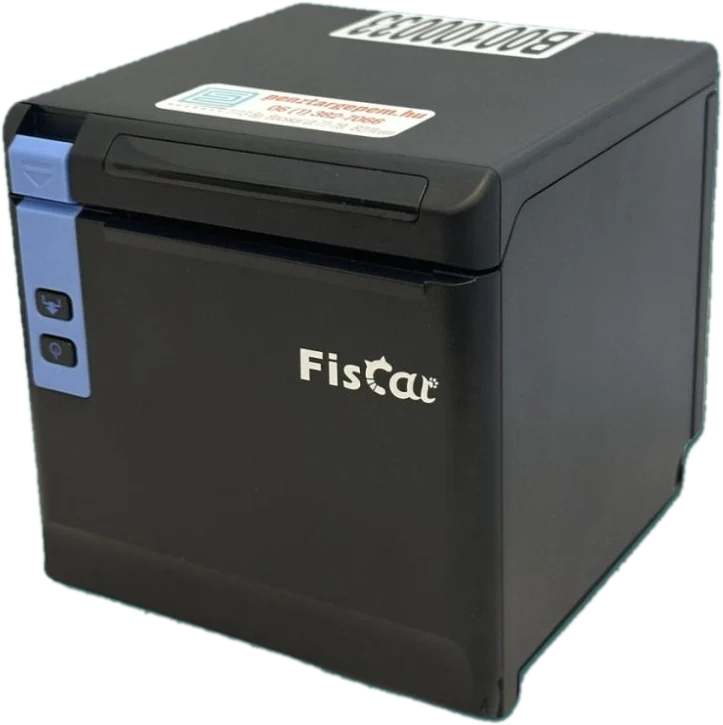
Fiscat Super eFP e‑cash register
Receipt and daily closing. The pilot starts with this. It is on the list of approved e‑cash registers (in Hungarian).
Soon
Fiscat and CashBox online cash registers
With the same receipt call as the e‑cash register.
After that
Slip and label printers, scale, extra display
Kitchen tickets, order slips, shelf labels and weighing on the same API. Later, invoices too.
We will put dates here once we can say something certain. In the application we ask which device you would connect first.
Try it without a cash register
In the sandbox you call the same API with a test API key. The virtual receipt and the extra display appear in your browser, with the log of commands below. You trigger errors with one click and see how your POS software reacts. Pilot partners get it first.
1113 Budapest, Példa utca 1.
Virtual extra display
- receipt a6f1…1187 accepted
- receipt a6f1…1187 succeeded, 0042/00137
- event paper_low, REG-0042 warning
- retry a6f1…1187 already done, same response
About us
EcoSoft Pénztárgép és Informatikai Kft. sells and services cash registers in Budapest, and develops software. We distribute several e‑cash register families, and our own technicians install and repair them.
Software development is not new to us either. We also develop our own business management system, EcoSoft ERP, and our company runs on it.
Bridge grew out of these two: we know cash registers from the service counter, and cloud software from our own development. It was designed by our own engineers, and security has been part of it from day one: the box only connects outwards, updates go out signed and in small groups, and if something fails the box rolls back by itself.
- What we do
- Cash register sales and service, software development. We distribute several e‑cash register families, including the Fiscat Super eFP.
- Enquiries
- sales@ecosoft.hu, or fill in the application form.
- Phone
- +36 1 382 7066
- Shop and service
- 1113 Budapest, Bocskai út 77-79.
Monday to Thursday 9–17, Friday 9–16. - Online shop
- penztargepem.hu
- Company details
- Company registration number: 01 09 068518
Tax number: 10621992-2-43
What we ask for it
One monthly fee per box. No separate charge for the hardware, the software or the operations.
HUF 2,500 + VAT per month, per box
- Included
- The Bridge box, the software, the updates and the operations. If the box breaks, we replace it.
- On one box
- Up to 5 devices, of which at most 1 fiscal unit at a time.
- Commitment
- None.
- Billing
- Quarterly.
- Several boxes
- We give a volume discount. In your application, tell us how many stores are involved.
The Bridge box: Fujitsu FUTRO S930, 52 × 195 × 251 mm, 1.3 kg. LAN or Wi‑Fi, USB, serial port, external power supply. Drag to rotate.
We start with a few partners, in real stores
We shape the API together with our pilot partners, and they get the sandbox first. Tell us what you work with, and we will get in touch.
News about Bridge development
We will write when a new device can be connected, when the sandbox is ready, or when the API changes. You do not need to apply for the pilot for this.